How to Break RAR File Password Using RAR Password Unlocker

RAR Password Unlocker contains three Modes to Recover Password.

I will discuss all three Steps one by one.

Method 1 -  Brute-Force Attack

In Brute-Force Attack, Software tries all Possible Combinations.
The Password may contain a-z, A-Z, 0-9, All Symbols so Software tries all Possible Combinations in Order to get the Password.
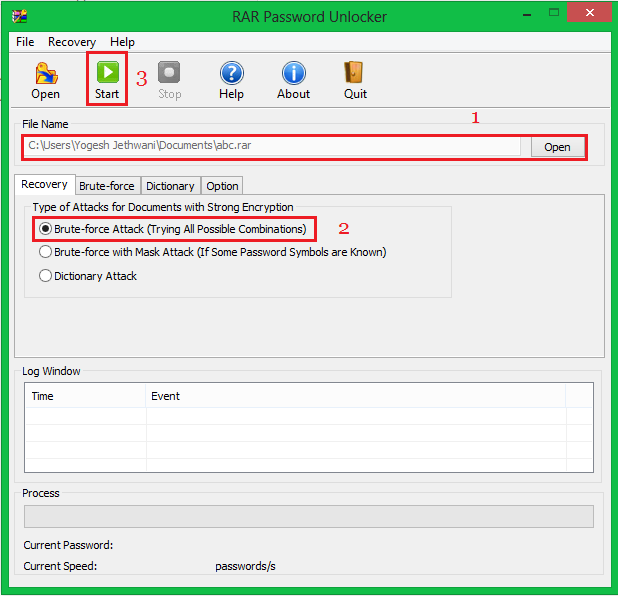
RAR-Password-Unlocker-Brute-Force-Screenshot-7
Screenshot 7

This method takes a lot of Time.

But if you know how many Characters your Password contains than Method 2 will be Helpful for you.

Method 2 - Brute-Force with Mask Attack

In this Method you can give some Details related to your Password to the Software like if your Password contains 5 Characters then you can Specify that your Password has 5 Characters so the Software will take less time to Recover your Password.
If your Password only contains Letters then you can Specify that to the Software and it will take less time to Recover Password.

RAR-Password-Unlocker-Brute-Force-Screenshot-8
Screenshot 8

RAR-Password-Unlocker-Brute-Force-Screenshot-9
Screenshot 9


That's how you can Recover Password you Method 2.


But if you think that Password assigned to the File has Some Meaning like "Dog" or "cat" or Something like that, then you can use the Method 3.


Method 3 - Dictionary Attack

This Method can be used when the Password is a Meaningful Word like "Dog" or "cat" or Something like that.

In this Method the Software compares all the Meaningful Words that are Stored in its Database with the Password String and if some Word matches then Software will show that word and it will be your Password.

RAR-Password-Unlocker-Brute-Force-Screenshot-10
Screenshot 10


This method takes a lot of time to Recover Password.


That were all three Methods that you can use to Recover your Password from RAR File using RAR Password Unlocker.

Turn off Auto Update in Google Chrome

Google Chrome was created to silently update every six weeks. This measure ensures that the internet browser carries the most recent technology and stability, without your need to allow or download each update.

However, it is possible at times that the newer versions of Chrome are more unstable than previous versions. These new versions may contain bugs that make it incompatible with your tasks.

A good way to prevent this is to disable auto-update. There are several ways to stop your Chrome from auto-updating its version. Outlined below is the easiest way to do so.

Read This Tutorial Also - How to use Old Version of Google Chrome

A. On your Chrome browser's address bar, type in 'about:plugins' and hit ENTER.

about_plugins.jpg

B. Find the plugin called 'Google Update' and click disable.

ScreenHunter_03_Apr._01_08.55.jpg

C. Restart your browser for the changes to take effect.

Other procedures to disable auto-update are also available, including disabling it from "msconfig" and "Task Scheduler" in Windows.

How to Use Old Version of Google Chrome (Turn Off Auto Update)

If you want to revert your Chrome internet browser to an older version, follow the steps below.

How to Uninstall Chrome

Close all open Chrome browsers.

Go to Start, find Google Chrome in the list of programs, and click Uninstall. After it uninstalls, restart your computer for the changes to take effect.

How to Install an older version of Chrome

Look for an older version of Chrome from download websites. One such website is http://HamariApps.blogspot.com We recommend Chrome 19 or 17.

After you download the installer, run it, and the installation begins.

After the installation completes, please remember to stop auto-update, so you can retain the version you just installed.

How to use Jetpack Photon Without Jetpack Installed - Wordpress

How to use Jetpack Photon Without Jetpack Installed


If you have used Jetpack before, you may already know it has a great feature called Photon which is a free CDN service for your images. By caching your image and served from WordPress.com, your site could be running faster.


Important Note: Photon is a free image CDN service but it doesn’t mean you can abuse or violate WordPress.con TOC.

So, how to use Photon without Jetpack installed?
add_filter( 'the_content', 'wpse39167_replace_image',9999 );
function wpse39167_replace_image( $content )
{
 $content = preg_replace_callback( "@<img.+?src=[\"'](.+?)[\"'].+?>@", 'wpse39167_maybe_replace_image', $content );
 return $content;
}

function wpse39167_maybe_replace_image($matches){
    if(!$matches[1])
  return $matches[0];

    $counter = wpse39167_static_counter( $matches[1] );
    $wp = 'http://i'.$counter.'.wp.com/';
 $url = str_replace(array('http://','https://'),$wp,$matches[1]);
 return str_replace($matches[1],$url,$matches[0]);
}

function wpse39167_static_counter( $url ) {
        srand( crc32( basename( $url ) ) );
        $static_counter = rand( 0, 2 );
        srand(); // this resets everything that relies on this, like array_rand() and shuffle()
        return $static_counter;

}
Put these in your theme’s functions.php and you are done. To learn more how to make your site faster

6 Future Algorithms Updates by Google


How to Disable Right Click on Blogger

You might have noticed that in some websites or blog right click is disabled . Now you can also add "Disable Right Click on Blogger"widget on your blog and protect your copyright content from being used in any other website.

Follow these steps to Add "Disable Right Click on Blogger"


  1. Log in to Blogger Dashboard --> Layout --> Page Elements
  2. Click on 'Add a Gadget' on the sidebar
  3. Select 'HTML/Javascript' and add the code given below and click save.

?
<script language="JavaScript"><!-- //Disable right click script III- By FileXOne! (filexone.blogspot.com) var message="";///////////////////////////////////function clickIE() {if (document.all) {(message);return false;}}function clickNS(e) {if(document.layers||(document.getElementById&&!document.all)) {if (e.which==2||e.which==3) {(message);return false;}}}if (document.layers){document.captureEvents(Event.MOUSEDOWN);document.onmousedown=clickNS;}else{document.onmouseup=clickNS;document.oncontextmenu=clickIE;} document.oncontextmenu=new Function("return false")// --></script>
Useful Tip: If you want to protect your images/pictures, then our suggestion is to add a Watermark (logo) on images

Don't duplicate content on your site (AVOID)

One trick that spammers like to use is to create one page and then post it in numerous locations, both on one domain and on others. The idea is that if there are enough copies of the page, it will get seen by more people. But search engines don't like duplicate content as it's a waste of space on their servers and does not provide good information to their customers. If a search engine suspects your site is spamming them with multiple copies, your site could be banned.

How To Display Read More Link in Blogger Post Summaries

To make your site load faster, to prevent your site from duplicate content and for a better SEO score many bloggers suggests using summaries (excerpts).

Post summaries provide a tiny-description of your content which usually consists of four to five sentences, which is there to give an idea to the reader about the whole story in just a few lines. To see a live example, check our homepage where you might notice a read more link present towards the bottom of post excerpts. In this article, we will show you how to automatically add a Read more Link in Blogger Post summaries.

How to Remove Hyperlinks from Post Images in Blogger

If you are using a custom Blogger template, then you probably have noticed that few of the third-party developed templates does not supports Lightbox functionality, which causes images to be opened in a new tab window whenever they are clicked by the users. Recently, one of our users asked us that How to Remove Hyperlinks from Post Images in Blogger? The easiest way to remove hyperlinks for post images in blogger is to simply revert to the HTML Tab in the blogger post editor and remove the hyperlink. However, what if you have to edit gazillion posts? Today in this article, we will show you How to Remove Hyperlinks from Post images in blogger.

How do 'NOODP' and 'NOYDIR Meta Tags Help in SEO?

Meta tags like 'NOODP' and 'NOYDIR' are mostly used by the webmasters who have a DMOZ or Yahoo listing. Dmoz is an open directory project which is overlooked by thousands of people and have a lot of influence on Google's search results. Say if some one searches for something, Google would display the keywords and description for that particular search results with the keywords that are listed with DMOZ library.

Google Explains The NOINDEX, NOFOLLOW, NOARCHIVE & NOSNIPPET META Tags

The Google Blog has a basic but clear explanation of the robots exclusion protocol.

(Working) Create a Blank Facebook Page without any Name

Earlier I published a trick to create a Facebook page without any name, that trick worked for few months but Facebook made some changes in to their system and that older trick works no longer. I have found a new way to create a Facebook page without a name. A few people asked what is the benefit to create a page without a name. Well, to put it simple, I would say its just cool to have a page without any name.  Lets move to the trick and know the method to create a nameless Facebook page.

Secure Your Facebook Page By Adding Hidden Manager

I'm Back with New Facebook Trick. :) I got a new Working Method on Facebook To Protect Your Page From Hackers or You Can Say We Can Recover our Facebook Page After Getting ripped :D

ADD SEO Meta Tags Title, Description and Keywords in Blogger

SEO Meta tags are very important for any blog so we give you how to ADD SEO Meta Tags Title, Description and Keywords in Blogger. Meta tags give all about documents and crawl by Google crawler in their search engine. Meta tags not display on the page but its show in search engine results of your website. Meta elements are show page description, keywords, author, author email and other metadata. Google bots read Meta tags of blog and give this information to Google search engine to show your website in Search Engine results Pages (SERP).

7 Killer Blogspot SEO Tips

As you may have noticed this blog mostly focuses on Blogger.com and SEO for beginners nowadays. This is because I personally know there are many  guys asking me for SEO Tips and Blogger blogs setting. I have been asked questions on Mobile Phone, Email, Comments and on Facebook that how to do the correct SEO setting for a Blogger Blog. So today, I made a quick video tutorial on this topic. I already have published the complete Blogger SEO Pack 2012 in Urdu on this blog. You should also check out my previous lessons about Blogger's SEO. But for now lets start what to do when we start a new blog with blogger.com? Read top 7 tips and implement them ASAP. 

Avast Professional Antivirus 3 Years License (Giveaway)

LF (LearnFre) Proudly Presents their First Giveaway.!
[ Avast Professional Antivirus 3 Years License ]
Just Join the Giveaway Content and Get Points as much as You Can to Win the Prize. :)

Why You Should Use Blogger

Blogger is the only free and robust content management platform but in spite of getting the credit and appreciate people always degrade it for its sluggish and rusty behavior.

Create a line separator using only CSS

Today LF (LearnFre) will tell you how to convert it into CSS without using a single image . so Let's get Started. :)

How to Make Your Links Change Colour When the Mouse Hovers Over It (Using CSS)

If you were to move your mouse over the links on learnfre.blogspot.com, you would notice that they are highlighted with a different colour. This article explains how you can achieve such mouseover or hover effects with links on your site.

Hover effect on images in posts

This is an easy trick but an amazing one too, bring the photos in your post to life with this hover effect trick.

You may have seen this on many big websites, these types of hover effects keeps the reader engaged with your blog and if they are getting bored they can simply play with it.